ClickDesigns X Review 2026: Features, Price, Bonuses and Refund Policy
Good visuals help a product or offer look more credible, but making them usually means learning design tools, writing AI prompts or paying a freelancer for every change. Whether you sell your own products, promote other people's, or make graphics for clients, ClickDesigns X aims to put the whole job in one dashboard.
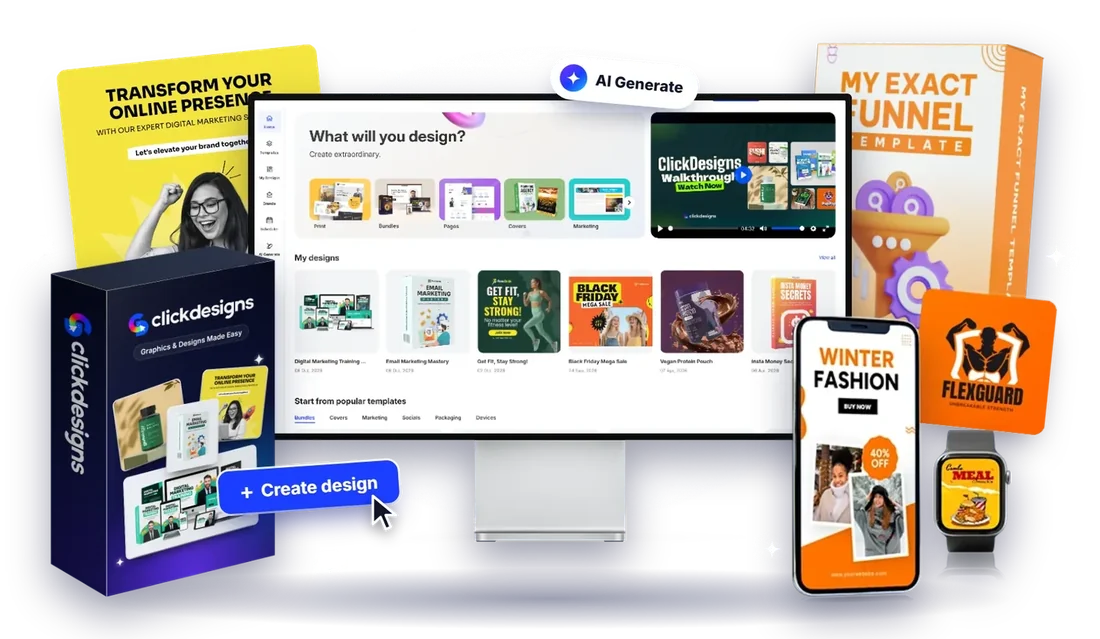
ClickDesigns X is a browser-based design and mockup tool. You customise a design, and its MagicWrap feature wraps it onto 3D models such as book covers, software boxes, laptops, phones and bottles, then gives you several angles and layouts. It also includes templates, stock assets and a commercial license.
With ClickDesigns X you can build covers, box shots, product bundles, social graphics, ads and more without redrawing the artwork for each angle. This review explains what it does, what it costs, what the vendor lists as bonuses, who it suits and what to check before you buy.
>> See the Current Price and Features on the Official Page <<
ClickDesigns X Review 2026 – Overview



| Vendor | BlackChillies FZE (named in the vendor's legal notice) |
|---|---|
| Product | ClickDesigns X |
| Official website | CLICK HERE |
| Front-End Price | One-time launch price listed at $39 (shown as reduced from $67). Check the official page for today's price. |
| Regular Price | The vendor lists $97 per month and says the launch deal will switch to a monthly subscription without notice. |
| Commercial License | Included, so you can make graphics for clients |
| Optional Upgrades | None listed on the vendor's sales page |
| Bonuses | Yes, 2 launch bonuses from the vendor (see below) |
| Skill | All Levels |
| Guarantee | 30-Day Money-Back Guarantee (stated by the vendor) |
| Niche | Graphics, Design and 3D Mockup Software |
| Best For | Marketers, product sellers, affiliates, authors, course creators and freelancers |
Details come from the vendor's public sales page and may change. Always confirm current terms on the official page.
ClickDesigns X Review 2026 – What Is It?
When you sell online, buyers cannot pick up your product. They judge it by what you show them. A flat cover image or a plain graphic can undersell something you put real work into.
The usual options are design software that takes time to learn, AI image tools that need prompts and re-generation, or freelancers who need briefing and revisions. Each has a cost in time or money.
ClickDesigns X takes a different route. You design or pick a template once, and the software maps it onto 3D product models and gives you more angles and layouts, so you can reuse one design across your pages, ads and social posts.
WHAT DOES IT COVER?
ClickDesigns X is designed to help non-designers produce professional-looking graphics and mockups. You work in 3 steps:
- Step 1: Customise
Start from scratch, use a template, add your own image or upload a PDF, and edit it in a drag-and-drop editor. - Step 2: Automate
With 1-click MagicWrap, flat artwork is wrapped onto a 3D product model such as a book, box, device or bottle. - Step 3: Use it
Get multiple angles, layouts and bundle arrangements of the same design, ready for pages, ads, emails and social posts.
ClickDesigns X can be useful for entrepreneurs, affiliates, authors, course creators, software sellers, e-commerce owners, social media marketers and freelancers who want visual assets without managing a designer. The vendor says the commercial license also lets you sell the graphics you create as a service.
To sum up, ClickDesigns X offers a practical way to produce mockups and branded graphics faster. Good visuals can help presentation, but they do not guarantee more clicks or sales.
ClickDesigns X Review 2026 – Features and Benefits
These are the features the vendor lists:
- Drag-and-drop editor: a point-and-click editor for graphics, with layer management and a multi-page canvas for building a set of assets in one project.
- 3D Product Studio and 1-click MagicWrap: wrap one flat design onto 3D models and get several angles and layouts.
- 2D and 3D product mockups: book covers (paperback and hardcover), software, report and magazine covers, laptops, monitors, tablets, phones, CDs and DVDs, watches, supplement tubs, pill bottles, gummy bottles and bottle droppers.
- Design template vault: thousands of customisable done-for-you templates, including product bundle mockup templates.
- Media assets: royalty-free photos, illustrations, fonts and pairings, shapes, icons, textures, backgrounds and 3D elements.
- Use-case coverage: web and sales pages, social posts and ads, email, YouTube thumbnails, Pinterest pins, banners, and printable items such as business cards and flyers.
- Import and export: import your own designs and logos; export in JPG, PNG, WebP or PDF at up to 300 DPI.
- Website builder integrations: the vendor lists GoHighLevel, Convertri, ProductDyno and Groove.cm.
- Commercial license: use the designs for client work.
- Training videos and support: beginner-to-expert video training and a support team.
Features are described as the vendor presents them. The vendor says the app runs in the browser with nothing to install. Check the official page for current template counts and supported integrations.
>> Check the Full Feature List on the Official Page <<
ClickDesigns X Review 2026 – How Does It Work?
- Log in through your browser. There is nothing to install.
- Start from a template, a blank canvas, your own image or an uploaded PDF.
- Edit text, images, colours, layers and backgrounds in the drag-and-drop editor.
- Choose a product model, such as a book, box, laptop or bottle, and apply MagicWrap to wrap your design onto it.
- Spin, tilt and zoom the model to choose angles, and try different bundle layouts.
- Export in the format you need, and check that the result looks right wherever you plan to use it.
Ways to Use ClickDesigns X
The vendor describes these uses. They describe how the tool can be used, not what you will earn:
- Your own products: covers, box shots and bundle images for sales pages, checkout pages, membership sites and stores.
- Affiliate assets: your own promotional visuals and bonus-page graphics, instead of the same vendor graphics every other affiliate uses.
- Social and ads: posts, ads, thumbnails, banners and carousels.
- Digital products: course modules, eBook covers, lead magnets and software box shots.
- Print: business cards, flyers, posters and similar items.
- Client work: with the commercial license, graphics and mockups for paying clients.
These are examples of use, not predictions of what any buyer will earn.
Who Is ClickDesigns X For?
It may be a fit if you are:
- A product seller, author, course creator or software creator who needs covers, box shots and bundle images.
- An affiliate or marketer who wants your own branded promotional graphics.
- A freelancer or funnel designer who wants to offer mockups and graphics to clients.
- A beginner who wants templates and a drag-and-drop editor rather than professional design software.
It is probably not a fit if you:
- Expect better graphics alone to guarantee clicks, conversions or sales. The vendor's own disclaimer says the product does not guarantee income or success.
- Need advanced vector illustration, photo retouching or full video editing. This is a template and mockup tool.
- Do not want to spend time editing and checking each design.
- Already have a design workflow that covers your needs.
ClickDesigns X Review 2026 – Price and What's Included
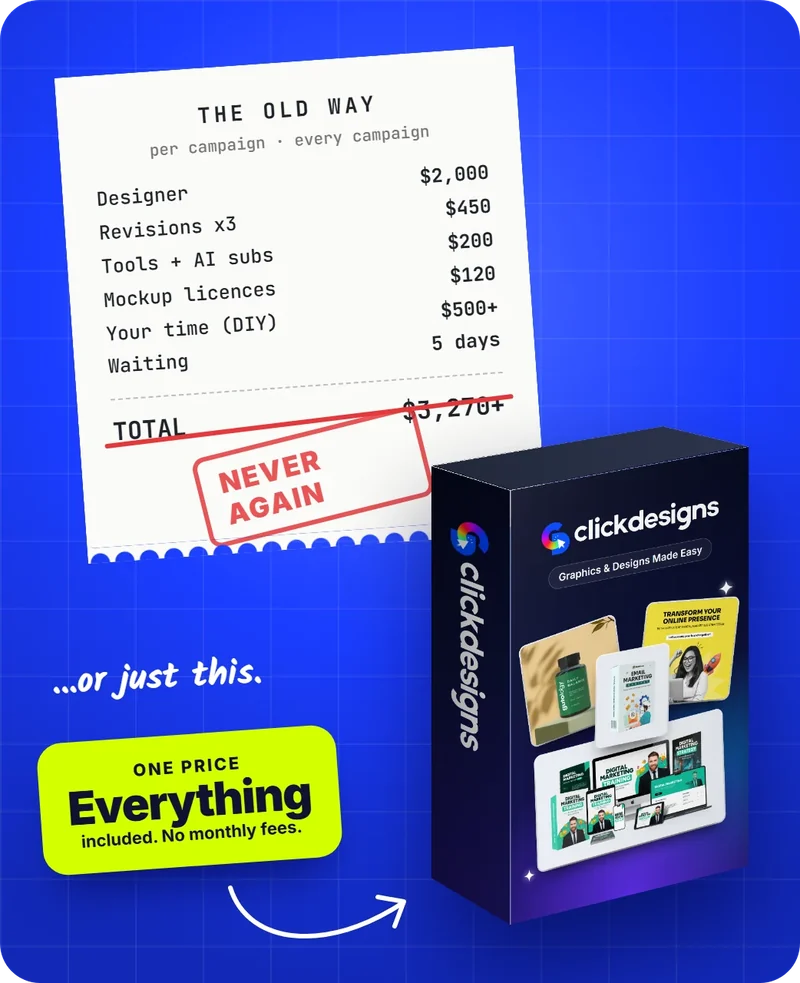
Listed by the vendor as a one-time payment (shown as reduced from $67), at the time we read its page. The vendor lists a regular price of $97 per month and says the launch price will switch to a monthly subscription without notice.
Prices change, so the final price is the one shown at checkout on the official page.
The vendor lists these as included:
- The ClickDesigns X editor, 3D Product Studio and 1-click MagicWrap
- 2D and 3D product mockups
- Thousands of customisable design templates and bundle mockup templates
- Millions of royalty-free media assets, plus fonts, textures, elements and icons
- Advanced editor features: layer management, multi-page canvas, import and export formats and website builder integrations
- Commercial license
- Training videos and support
- Two launch bonuses (see below)
The fine print:
- Refund policy: the vendor states a 30-day money-back guarantee. Contact the vendor within 30 days. Refunds are handled by the vendor, not by us.
- Launch pricing may end: the vendor says the deal will move to a monthly subscription. Check what you will pay and for how long before you buy.
- No upgrades listed: we found no paid upgrades on the sales page, but read every checkout screen in case offers are added.
- Vendor-stated values: the page shows large "value" figures for each feature. These are the vendor's own numbers, not the price of each item.
- No guarantee: the vendor's disclaimer says the product does not guarantee income or success.
- Retailer: the vendor states that JVZoo acts as the retailer for the purchase.
🎁 ClickDesigns X Launch Bonuses
The vendor lists exclusive launch bonuses with ClickDesigns X. These bonuses are offered by the vendor, not by AiReview, and they may change or be withdrawn.
🎁 BONUS #1: Custom Product Bundle Creator
A custom mockup template designer. You add your own design to a blank mockup and build your own custom product bundle.
Vendor-stated value: $997
🎁 BONUS #2: 1000s of Custom Logos
A library of ready-made, customisable logos that you can edit inside the editor.
Bonuses are provided by the vendor. They are not guarantees of sales, profits or business success. Confirm the current bonus list on the official page.
Before You Buy: Set Realistic Expectations
- No guarantee of income. The vendor's disclaimer says the product does not guarantee income or success. Better visuals can help presentation, but results depend on your offer, traffic and market.
- Check the pricing model. The vendor lists a launch price now and a monthly price later. Make sure you understand what you are agreeing to at checkout.
- Check the license. Read the vendor's terms for what the commercial license allows, especially for client work and resale of templates or assets.
- Use only what you may use. If you add other people's logos, photos or brand names to a design, you need the right to use them.
- Test before you rely on it. Make a few designs and exports, and check the quality at the sizes and print resolutions you need.
- Testimonials are the vendor's. We have not verified the user numbers, savings figures or endorsements on the vendor's page, and we do not repeat them here.
Frequently Asked Questions
What is ClickDesigns X?
It is a browser-based design and mockup tool. You create or customise a design, and MagicWrap wraps it onto 3D product models such as books, boxes, devices and bottles, giving you multiple angles and layouts.
Do I need design skills?
The vendor says no. It offers templates, a drag-and-drop editor and training videos. You will still need good judgement about what looks right for your audience.
Do I need to install anything?
No. The vendor says it is cloud-based and runs in the browser.
What can I create?
Examples include book and software covers, box shots, device mockups, bundle images, social posts and ads, banners, thumbnails, logos and printable items such as flyers and business cards.
What is MagicWrap?
The vendor's name for its feature that maps a flat design onto a 3D product model in one click, so you can produce several angles without redrawing the artwork.
Can I use my own images and logos?
Yes. The vendor says you can upload your own logos, photos and graphics. Make sure you have the right to use anything you upload.
Can I use it for client work?
Yes. The vendor says a commercial license is included. Read the license terms for the exact scope.
Which formats can I export?
JPG, PNG, WebP or PDF, at up to 300 DPI according to the vendor.
Does it connect to other tools?
The vendor lists integrations with GoHighLevel, Convertri, ProductDyno and Groove.cm. Check the official page for the current list.
Is it a one-time payment or a subscription?
The vendor lists the launch price as a one-time payment, with no monthly fee for those who buy at that price. It also says the offer will switch to a monthly subscription, with a regular price listed at $97 per month. Check the checkout page for what applies when you buy.
Do I need upgrades?
We found no paid upgrades on the sales page. Read each checkout screen to confirm what you are buying.
Are there bonuses?
Yes. The vendor lists two launch bonuses: a Custom Product Bundle Creator and a library of custom logos. They come from the vendor, not from AiReview.
Is there a refund?
The vendor states a 30-day money-back guarantee. You contact the vendor within 30 days. Refunds are handled by the vendor.
Where do I get support?
The vendor lists a support site at support.clickdesigns.com. We do not provide product support. See our contact page for details.
Is this the official ClickDesigns X website?
No. This is an independent review. Our buttons take you to the official page and any purchase is made there. We may earn a commission, as explained in our affiliate disclosure.
Are results guaranteed?
No. Results vary from person to person. See our disclaimer.
How to Get Started
- Step 1: Open the official ClickDesigns X page and review the current price, the license, the bonuses and the refund policy.
- Step 2: If you decide to buy, complete checkout on the vendor's page. For product help or refunds, contact the vendor (see our contact page).